Buyer guide
Best License Plate Recognition Software for Private Property
Compare LPR and ALPR software for existing cameras, edge processing, gate access, parking, cloud management, and turnkey private-property deployments.
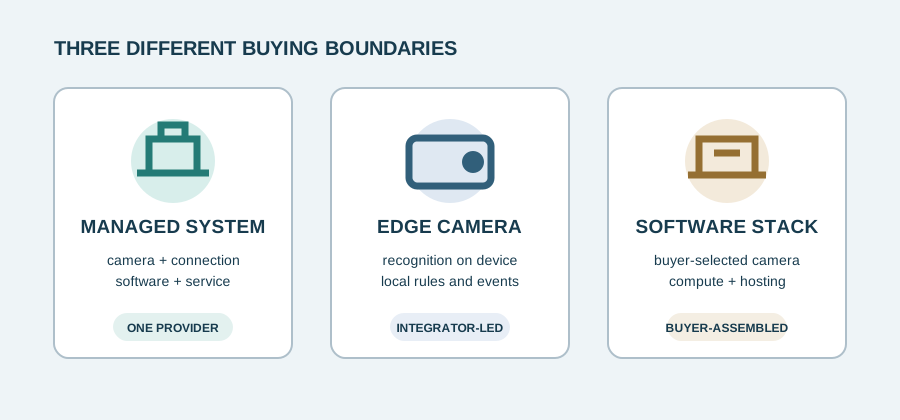
For HOAs, gated communities, multifamily properties, parking operators, self-storage facilities, dealerships, commercial sites, private security teams, and integrators, “software” can describe very different products. A monthly analytics license does not include the cameras, compute, power, networking, installation, storage, or gate hardware that a complete managed service may bundle.
This guide compares six documented approaches by deployment model and buyer fit. It is based on vendor documentation, not hands-on testing, and it does not treat recognition claims as directly comparable benchmarks. See the broader Software & Systems hub or the private-property camera guide when camera geometry and complete-system design are the primary decision.
Quick comparison
Vendor documentation reviewed September 26, 2026. “Best fit” is Plate Reader Guide’s editorial assessment of the documented architecture, not an overall ranking or performance test.
Software categories explained
Software for buyer-supplied cameras
A local recognition agent or cloud service consumes compatible IP-camera streams. This can preserve existing infrastructure, but the buyer or integrator remains responsible for image quality, compute, networking, storage, and support boundaries. Plate Recognizer Stream and Rekor Scout fit this category.
Edge or on-camera applications
Recognition runs inside a supported camera. That reduces server and bandwidth requirements and can keep gate decisions local. AXIS License Plate Verifier and Vaxtor VaxALPR On Camera use this model, but neither turns an arbitrary camera into a suitable LPR camera.
Cloud-managed camera platforms
The camera performs some processing or storage locally while a cloud service provides administration, search, alerts, user permissions, and multi-site access. Verkada LPR is the clearest example in this shortlist. Cloud management should not be confused with sending every video frame to the cloud.
Complete turnkey systems
The vendor supplies more than recognition software. Flock’s documented HOA model bundles Flock hardware, LTE, cloud software, installation, maintenance, and support. This reduces the buyer’s integration burden but also limits camera and hosting choice.
Best LPR software by use case
Existing-camera deployments
Compare Plate Recognizer Stream and Rekor Scout Pro. Both accept compatible buyer-supplied streams. Plate Recognizer offers a modular recognition-plus-parking stack; Rekor packages a local agent with a searchable cloud or self-hosted Scout dashboard. Validate each actual camera feed before assuming reuse.
Local or edge processing
Compare Axis and Vaxtor. Axis offers a documented application, supported-device list, local event storage, and native Axis gate workflows. Vaxtor is relevant to integrators who need an embedded engine on a supported partner camera and intend to send events into another VMS or application.
Turnkey managed deployment
Flock is the managed-system option. It is the clearest fit here when a site values solar power, LTE, installation, and lifecycle service inside one vendor boundary more than camera choice, local hosting, or a documented gate-control path.
Integrated video and access control
Verkada is the integrated-platform option. Its current documentation connects compatible Verkada cameras, Command, plate search and alerts, audit controls, and plate credentials for Verkada access control. It is not an existing-camera software layer.
Parking and gate workflows
Plate Recognizer and Axis document the most direct paths in this shortlist. Plate Recognizer uses Stream, ParkPow, webhooks, and a local Gate Opener or Controller. Axis can use camera I/O, a relay module, an Axis door controller, or Secure Entry. The better fit depends on whether the project centers on flexible streams or an Axis edge environment.
Integrator-controlled architecture
Plate Recognizer, Rekor, Axis, and Vaxtor all expose integration paths. Their boundaries differ: Stream and Scout run on buyer-managed compute, while Axis and Vaxtor run on supported cameras. Compare the documented event formats and failure behavior, not only whether a page says “API.”
These are conditional fit assessments, not declarations that one platform is universally better. The Flock alternatives guide compares the same system-boundary issue from the perspective of replacing or avoiding a managed Flock deployment.
Individual platform profiles
Modular existing-camera software
Plate Recognizer Stream and ParkPow
- Best for
- Parking operators, gated properties, businesses, and integrators wanting camera and hosting flexibility
- System type
- Live-stream recognition software plus an optional parking-management and search dashboard
- Pricing status
- Published subscription entry prices; cameras, compute, storage, installation, and integration are separate
Key strengths
- Cloud, on-premises, or buyer-cloud Stream deployment with webhook output
- ParkPow adds searchable visits, multi-site administration, alerts, roles, audit activity, parking workflows, and a documented gate path
Key constraints
- Buyer or integrator must validate and maintain the camera, network, compute, and capture geometry
- Stream alone is a recognition engine; the dashboard, gate software, and some vehicle attributes are separately priced
Deployment notes: Use Stream Cloud for less local compute management or deploy Stream on-premises/in a buyer cloud for more control. ParkPow is available in cloud and on-premises forms.
Camera and core software: Stream accepts configured live camera URLs, including RTSP examples in the current documentation, and returns recognition events through webhooks; the on-premises version can also output CSV and JSON. ParkPow adds vehicle history, site and camera views, analytics, vehicle tags, custom alerts, exports, API access, user roles, and an activity-log audit view.
Gate and data notes: the documented Gate Opener runs on a Raspberry Pi, receives Stream events, synchronizes a ParkPow allowlist, and triggers a gate through local GPIO/RTE-style inputs. ParkPow Cloud currently documents one-year retention for visits and alerts, while vehicle records, tags, and alert templates remain until deletion or account closure. A general customer-data ownership statement, native mobile app, Wiegand path, OSDP path, and law-enforcement sharing model were not established in the reviewed product documentation.
Pricing: Stream is listed at $35 per camera per month; Stream with make/model/color and other attributes is $45; ParkPow Standard is $20 per camera per month; and Gate Opener or Gate Controller is $10 per gate per month. Annual, perpetual, volume, infrastructure, and professional-service choices can change the total.
Official sources: Stream product overview, pricing, Stream deployment guide, ParkPow user guide, ParkPow retention FAQ, and Gate Opener documentation.
Existing-camera agent and dashboard
Rekor Scout Pro
- Best for
- Businesses, self-storage, dealerships, private security, and integrators with suitable IP cameras and local technical support
- System type
- Local recognition agent with a Rekor-hosted or self-hosted web dashboard and configurable data destination
- Pricing status
- $72/month per camera for Pro; Enterprise and fully on-premises licensing require a sales contract
Key strengths
- Works with compatible HTTP/RTSP streams and supports cloud, self-hosted, custom HTTP, or local-queue destinations
- Search, plate lists, alerts, user permissions, REST API, webhooks, and revocable cross-organization search sharing are documented
Key constraints
- Requires buyer-managed compute and camera configuration
- No turnkey gate-controller, relay, Wiegand, or OSDP workflow was found in the reviewed Scout documentation
Deployment notes: The Scout Agent runs on supported Windows, Ubuntu, Docker, or NVIDIA Jetson environments. Pro data can go to Scout Cloud or a self-hosted server.
Camera and core software: Scout expects an HTTP or RTSP stream URL from an IP camera; an ONVIF-capable discovery tool is suggested for finding that URL, but this does not guarantee that every ONVIF camera will produce plate-quality video. The dashboard documents searchable plate and vehicle results, blacklists and whitelists, scheduled alerts, multiple sites, CSV list exchange, user roles and permission groups, REST search, and JSON webhooks.
Data and sharing: Pro retention is configurable up to 60 days. Scout supports Rekor-hosted and self-hosted destinations, as well as a buyer HTTP endpoint or local queue for application integration. Cross-organization federated search is explicitly configured using a server URL and API key, does not move the source data out of the sharing account, and can be revoked. A public statement assigning ownership of customer plate data, a native mobile app, and a product-specific audit-log specification were not found.
Pricing: Rekor publishes Scout Pro at $72 per month per connected camera, with monthly and annual billing. Basic is cheaper but is positioned for individuals and homeowners, limits retention and users, and does not support self-hosting; this guide therefore uses Pro as the relevant business tier. Enterprise pricing is contract-only.
Official sources: Scout documentation, plans, pricing, and retention, camera streams, agent installation, data destinations, REST API, webhooks, and data sharing.
Licensed edge application
AXIS License Plate Verifier
- Best for
- Integrator-led vehicle access, parking, and local-processing projects using compatible Axis cameras
- System type
- On-camera analytics application with optional Axis Camera Station and Axis access-control components
- Pricing status
- Quote required; one application license per camera plus the camera, storage, VMS, controller, and installation as applicable
Key strengths
- Recognition, event storage, allow/block/custom lists, and gate decisions can run at the edge
- Documented I/O, relay, controller, Secure Entry, TCP, HTTP POST, VAPIX, CSV export, and search paths
Key constraints
- Runs only on supported Axis devices and requires careful camera selection and installation
- Organization-wide roles, audit behavior, mobile access, and external sharing depend on the wider Axis system selected, not the application alone
Deployment notes: Can operate as a stand-alone edge application for a lane or connect to Axis Camera Station, a relay module, a supported door controller, Secure Entry, or third-party software.
Camera and core software: the application installs on supported Axis cameras and stores plate events locally. It provides event search, allow/block/custom lists, vehicle attributes on supported devices, CSV export, and event delivery to third-party software through TCP or HTTP POST. Each camera requires its own application license; supported devices and capabilities vary by camera and current AXIS OS version.
Gate and data notes: Axis documents barrier workflows using internal camera I/O, a relay module, an Axis A1001 door controller, and AXIS Camera Station Secure Entry. The current manual does not document a direct Wiegand or OSDP output from License Plate Verifier itself. Retention is configurable and capacity depends on internal memory, SD-card choice, capture format, and any connected VMS. The application is locally operated, so data ownership, role-based access, audit logs, and external sharing must be evaluated at the camera/VMS/access-platform level.
Official sources: product overview, supported devices and licensing, current user manual, and application datasheet.
Partner-camera edge software
Vaxtor VaxALPR On Camera
- Best for
- Integrators that want embedded recognition and local actions on a supported technology-partner camera
- System type
- Licensed LPR application running inside supported partner-camera processors
- Pricing status
- Quote required; no current public license price or standard commercial term was found
Key strengths
- Embedded allow/block lists, API-managed lists, local I/O, and real-time event output
- Documented output options include VAPIX/ONVIF events, VMS integrations, and XML or JSON through HTTP/HTTPS
Key constraints
- Compatibility is model- and platform-specific; it is not a general-purpose service for arbitrary existing cameras
- Central search, retention, roles, audit logs, mobile access, and sharing depend on the chosen VMS or receiving application
Deployment notes: Recognition and basic list actions occur on the camera. An integrator typically connects the resulting metadata and images to a VMS, access workflow, or custom application.
Camera and core software: Vaxtor documents its recognition engine as an embedded application for technology-partner cameras, with Axis, Hanwha, and Mobotix platform manuals available. On-camera lists can be managed through the web interface, CSV, or API. Results can include plate and vehicle metadata plus full and cropped images, and can be sent through documented event and HTTP/HTTPS formats.
Gate and data notes: direct I/O and embedded lists support local access decisions without a central server. The reviewed sources did not establish direct Wiegand or OSDP support. Because Vaxtor is primarily the edge analytics layer, searchable history, retention, role-based access, audit logs, multi-site administration, data ownership controls, and external sharing are not uniform product features; they depend on the camera, VMS, and integration design. Buyers should require a model-specific compatibility list and written support boundary.
Official sources: VaxALPR On Camera overview, Axis developer guide, Hanwha setup guide, and Mobotix setup guide.
Integrated camera and cloud-managed platform
Verkada LPR
- Best for
- Multifamily, commercial, campus, parking, and multi-site operators already evaluating Verkada video or access control
- System type
- Compatible Verkada camera with on-camera recognition and retention managed through Verkada Command
- Pricing status
- Camera MSRP is published; a required license and the complete installed/access-control configuration must be confirmed
Key strengths
- Unified search, real-time monitoring, lists, alerts, CSV export, API access, role controls, and audit logging
- Documented LPR Unlock uses plates as credentials with access levels and schedules
Key constraints
- Requires a compatible Verkada bullet or remote camera and an active camera license
- Enabling LPR mode disables the camera’s people and general vehicle analytics; a context camera may be needed for wider scene coverage
Deployment notes: Recognition and video storage occur on supported Verkada cameras, while Command provides cloud management. Cameras continue recording locally during an internet outage but cloud access and alerts depend on connectivity.
Camera and core software: Verkada’s current LPR guide lists compatible bullet and remote cameras and documents historical plate search, live monitoring, plate lists, alerts across locations, CSV export, approximate matching, archived footage, and API access. It is an integrated vendor ecosystem, not a way to add LPR mode to a third-party camera or a Command Connector channel.
Gate and data notes: LPR Unlock links compatible cameras to Verkada access controllers and stores plates as credentials that inherit access levels and schedules. The current integration documentation does not describe Wiegand or OSDP as the LPR-to-controller path. Plate characters and associated footage follow the capturing camera’s retention period. Verkada documents granular roles, immutable platform audit logs, recorded reasons for LPR searches, and customer-controlled, time-limited sharing links.
Pricing: current camera MSRPs and retention options are published, but a camera license is required and the installed total depends on camera model, retention, mounts, power/networking or LTE service, installer labor, and any access-control hardware. Use a written configuration rather than treating camera MSRP as the system price.
Official sources: LPR user guide, LPR Unlock integration guide, pricing catalog, storage and retention, and privacy, roles, audit, and sharing controls.
Complete managed system
Flock Safety
- Best for
- HOAs, gated communities, multifamily, self-storage, dealerships, and businesses prioritizing a low-infrastructure managed rollout
- System type
- Flock-supplied camera, solar/battery power, LTE, cloud platform, installation, maintenance, and support
- Pricing status
- Quote required; the subscription varies by coverage, sensors, software package, and property or community size
Key strengths
- One vendor boundary for the documented camera, connectivity, cloud software, installation, and maintenance
- Search, real-time alerts, mobile app access, authorized-user controls, and optional customer-directed law-enforcement collaboration are documented
Key constraints
- Not a software-only license and not documented as a buyer-hosted platform
- A current private-property gate-control, relay, Wiegand, or OSDP workflow was not found
Deployment notes: The documented HOA offer uses solar-powered, LTE-connected Flock cameras and a vendor-operated cloud service. Flock handles installation and lifecycle service.
Camera and core software: Flock’s current pricing and HOA pages describe a complete subscription with devices, LTE, storage, software, installation, onboarding, maintenance, and support. The platform includes search, real-time alerts, cloud access, and a mobile app. Flock’s general pricing page says it can integrate existing IP or CCTV systems, but the reviewed private-property LPR sources do not define compatibility, commercial terms, or whether those integrations replace the Flock camera.
Data and sharing: Flock says the customer owns its data, authorized users control access, platform activity is logged, and private customers choose whether to share specific evidence or enable collaboration with law enforcement. The standard LPR retention period is currently seven days unless the agreement or applicable law sets another period; Flock says expired LPR data is hard deleted. API terms exist, but the public terms limit the stated API purpose to law-enforcement use, so this guide does not assume a commercial private-property API.
Pricing: the annual subscription requires a custom quote. Published material names technology type, device count, software package, coverage area, and property/community size as variables. Read the Flock Safety pricing guide for the full bundle, quote, contract, and renewal analysis.
Official sources: pricing and bundle overview, HOA deployment, access, and sharing overview, product FAQ, evidence and retention policy, data ownership guide, and customer terms.
What matters most in LPR software
- Camera compatibility and capture quality
- Confirm supported stream protocols, camera models, resolution, shutter control, frame rate, plate pixel width, night illumination, lane width, vehicle speed, and mounting geometry. “ONVIF compatible” or “works with IP cameras” does not prove that an existing view can capture readable plates.
- Search, plate lists, and alert behavior
- Define whether users need exact or partial search, allowlists, blocklists, time schedules, vehicle attributes, multi-site filters, exports, and escalation rules. Ask what happens with ambiguous reads and how list changes propagate to edge devices.
- Latency and outage behavior
- For a gate, measure the complete path from capture to decision to relay—not only recognition time. Document whether lists and decisions remain available when the internet, cloud service, local server, or controller is unavailable.
- Local, cloud, and edge processing
- Identify where recognition occurs, where images and metadata are stored, which functions require internet access, how updates are delivered, and who maintains compute hardware. A cloud dashboard can manage recognition that actually runs locally.
- API, webhooks, and access-control outputs
- Ask for the exact supported endpoints, event schema, authentication, rate limits, retry behavior, and commercial entitlement. Separately verify relays, controller models, request-to-exit inputs, Wiegand, OSDP, and fail-safe behavior; one interface does not imply the others.
- Roles, audit logs, and sharing
- Require named users, least-privilege roles, searchable audit records, export controls, and a documented external-sharing model. Determine whether law-enforcement access is unavailable, disabled by default, customer-initiated, federated, or built into the service.
- Retention and deletion
- Confirm separate retention rules for plate text, images, full video, alerts, lists, exports, backups, and audit logs. Ask who can change retention, whether deletion is automatic, and what happens to data at cancellation.
- Multi-site operations and recurring cost
- Compare organization hierarchy, site-scoped permissions, health monitoring, bulk list management, and support ownership. Normalize cameras, licenses, compute, storage, cellular service, installation, controllers, maintenance, replacements, and renewal pricing over the same term.
Software versus a complete LPR system
Software-only pricing is not a system price. Plate Recognizer Stream or Rekor Scout can be the right layer for an existing-camera project, but the buyer still needs suitable images, continuous compute, networking, storage, installation, and someone to diagnose failures. Axis and Vaxtor move compute into the camera, but still require compatible hardware, careful lane design, storage and integration choices.
Verkada packages the camera, onboard retention, and cloud-managed platform more tightly, while access control remains an additional part of the configuration. Flock draws the widest vendor boundary in this comparison by including its own camera, LTE connection, cloud service, installation, and maintenance in the documented subscription. Buyers should compare responsibilities and lifecycle costs before comparing a per-camera software fee with a complete managed quote.
Questions to ask before buying
- Is this quote for recognition software, an edge application, a camera-and-platform bundle, or a fully managed installed system?
- Which exact camera models, firmware versions, stream formats, and compute platforms are supported?
- Will the vendor validate our real lane, day/night images, plate sizes, angles, speeds, and regional plate formats before contract?
- Where do recognition, search, image storage, video storage, and list matching occur?
- Which functions continue during an internet, cloud, server, camera, or controller outage?
- Are searchable history, lists, alerts, exports, API access, webhooks, multi-site management, and mobile access included in the quoted tier?
- What documented gate path is supported: camera I/O, relay, request-to-exit, controller integration, Wiegand, OSDP, API, or webhook?
- How are users, roles, site permissions, audit logs, exports, and external sharing administered?
- Does the system share or federate searches with other organizations, and can every sharing relationship be audited and revoked?
- What are the retention and deletion rules for plate text, images, video, alerts, lists, backups, exports, and audit logs?
- Who owns the captured data, who can access it, and what export format and offboarding window apply?
- What are the one-time and recurring costs for cameras, software, compute, storage, cellular service, installation, gate hardware, support, and renewal?
- Who is responsible when a compatible camera produces poor reads, an integration breaks, or a software update changes behavior?
- Which claims are in the signed order and support agreement rather than only in marketing or a demonstration?
Methodology, sources, and important unknowns
This guide was last verified on September 26, 2026. Plate Reader Guide reviewed current vendor product pages, user manuals, integration guides, pricing pages, support documentation, and data-policy materials. It did not perform a physical installation, recognition-accuracy test, latency benchmark, or security audit. Vendor accuracy and speed claims were not used to rank the products because the vendors do not publish one controlled, directly comparable test method.
Platforms included: Plate Recognizer Stream/ParkPow and Rekor Scout represent software for buyer-supplied streams; AXIS License Plate Verifier and Vaxtor VaxALPR On Camera represent edge applications; Verkada represents an integrated proprietary camera and cloud-managed platform; Flock represents a complete managed private-property system. Genetec AutoVu was evaluated but omitted from the main shortlist because its documented SharpV-plus-Security Center architecture overlaps the integrated camera/platform category and would not make this software-led comparison more decision-useful.
Important unknowns: public sources did not establish a uniform accuracy measure, installed system cost, minimum term, renewal increase, support SLA, or regional plate coverage across all six platforms. Native mobile access was not established for Plate Recognizer, Rekor, Axis, Vaxtor, or Verkada’s specific LPR workflow. Direct Wiegand and OSDP support was not found for the reviewed LPR modules. Data ownership was not clearly established in the reviewed Plate Recognizer, Rekor, Axis, Vaxtor, or Verkada product materials; locally stored or customer-controlled data should not be described as customer-owned without contract language.
Commercial disclosure: No vendor or source link on this page is currently an affiliate link. Normal outbound analytics may record that a source link was clicked. Read the editorial policy and affiliate disclosure.